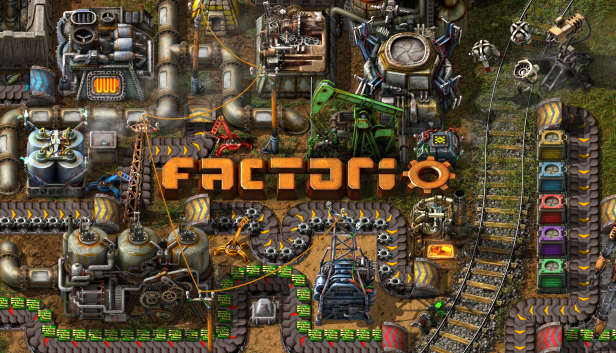
As you are probably already aware, some of our team members are going to attend PAX East in Boston next week. We figured we need some representative prints for our booth, but what to put there? We could have just made a big mega high resolution render of the player character or some other entity, but that would not tell the viewer much about what the game is about. So we thought it would be much better to "just" take a giant screenshot of a working factory, print it, and done! Now of course it’s much more complicated than that… The first obvious hurdle is that you need a savegame to take this screenshot of. So you go and try to take a bunch of random saves on your disk, you open them and find that it’s not so easy to just find a factory which would look nice. Such a factory needs to show enough of the various things to represent the game, can fit the logo somewhere, and must be large enough to fill about 275x185 tiles (3x2 meters at 150dpi taken at game zoom 2)... one square in the following picture is a chunk (32x32 tiles) Luckily I just had a savegame which was easy to adapt to those requirements, but I would like to ask the question, how does one build such a factory in general? That’s what I have been trying to figure out for a long time now. As some of you may have already noticed, I enjoy constructing very organic factories, a part of which eventually turns into a crazy mess. A mess as crazy as Factorio itself, representing what your will brain look like after playing Factorio. I find this to be a good opportunity to be a bit more specific and see a few examples to put it into more context...

Hello, It's Earendel back for another electric adventure. You got your first look at Fulgora in FFF-398. (If you haven't read that already please read that first.) Now let's take a look at the new planet's mechanics.

Hello, we usually show finished stuff in Friday facts these days, but I personally always liked to have a peek behind the curtains and see the (temporary) mess there. This motivated me to do some kind of overview of how the overall expansion development felt from my perspective. If you are like me, you might appreciate it. Our story starts in February 2021 with FFF-365 when we announced the plan to do the expansion pack.
It's the last Friday of 2018, and as such the last Friday Facts before the New year of 2019. We all hope everyone has had a great 2018, and looking forward to a lot more automation fun to come in 2019. Albert has produced a postcard for you all to share to give the year a good send-off.
Mod settings Right now when you want to customize a particular mod you have to: Know what folder the mods are stored on your computer Unzip the mod Figure out what line of which file has the thing you want to change Save and optionally re-zip the mod Hope what you changed is compatible with the way the rest of the mod works The game also forces everyone playing on the same multiplayer session to have identical mod files so any changes you've made make it impossible for you to join others unless they also have made those changes. This also makes it difficult for mod developers to troubleshoot bug reports because they don't know what you might have changed. This is obviously not so great and I want to address the main problem: there's no good way for mod developers to give users any portable way to configure their mods. To fix this we're going to add the ability for mods to define settings that will be presented like our in-game options menu now under a new section "options -> mods". This will let mods give some basic information about what kind of setting they have and we can present it to the player in a (hopefully) nice GUI with verification and feedback about why what they've entered isn't valid (if it's not valid) as well as the ability to change them runtime should the particular setting allow it. We can then sync these settings on joining multiplayer sessions (or not should you not want your settings to carry between games) and everything will just work.
Hello, these Friday Facts are focused solely on our view of gameplay issues in Factorio, and our plans to solve these.
Alpha blending and pre-multiplied alpha From time to time there is some confusion inside the team about how sprites are blended with the background when rendering, and what kind of effects we are able to achieve by tinting the sprites. So I (Posila) have decided to write up a few paragraphs about how alpha blending works (not only in Factorio), and what it means when someone talks about pre-multiplied alpha. When the GPU is figuring out what color it should draw on a particular pixel position, it runs a blending operation on just the computed pixel color and original color in the render target. There are several common blending operation modes (additive, multiplicative, overwrite, etc.), but the most common one used in Factorio is alpha blending. It calculates the resulting color using following equation (usually the new color is called 'source' and the background color that is being overwritten is called 'destination'): You can easily see that a source with alpha 0 will be fully transparent and the one with alpha 1 will be fully opaque. In games it is common to use a pre-multiplied alpha, which means the color channels of textures are stored in memory being already pre-multiplied by the alpha channel. Alpha blending with pre-multiplied alpha uses a simplified equation: Besides a slight performance gain from the GPU not having to do bunch of multiplication all the time, this equation allow us to do some extra effects we couldn't do without pre-multiplied alpha. Factorio renders sprites as colored polygons with texture. We usually refer to the color of a polygon as the 'tint', and every pixel of a sprite is multiplied with its tint. This is useful mainly for color masks, for example the diesel locomotive has a grayscale color mask which is tinted by the color it has set. Tints should have a pre-multiplied alpha too, but they don't have to, so we can use it to lie about the colors and alpha to the GPU. For example if we use tint {r=1,g=1,b=1,a=0} we can simplify previous equation even further and we get additive blending: This is great because that means we can switch between alpha and additive blending without having to change the blending state in graphics API, which would break sprite batching and result in an increase in the CPU cost of rendering. For some effects we use a tint with alpha between 0 and 1 heavily. This makes the result appear to be a combination of additive and alpha blending. For example, fire would eventually blend into a single solid color with pure additive blending, or would not look like it is emitting light with pure alpha blending. By using tint (1, 1, 1, 0.35) on the flame sprites, the brightness of overlapping flames adds up partially, but the flames don't completely lose their details. The same trick is used for smoke. Textures with pre-multiplied alpha also produce better results in texture filtering , which is probably the main reason why they are so widely used in the videogame industry.
Hello, once I changed the science packs for 0.15 , I had to do a playtest to have a feel of how the changes affect the game. I finished it just before writing this post: This was the first single player playthrough in a long time, so there was a lot of new findings. I also enjoyed all the new features, like blueprint book, auto trash, train conditions etc. These were little things but they helped a lot.
